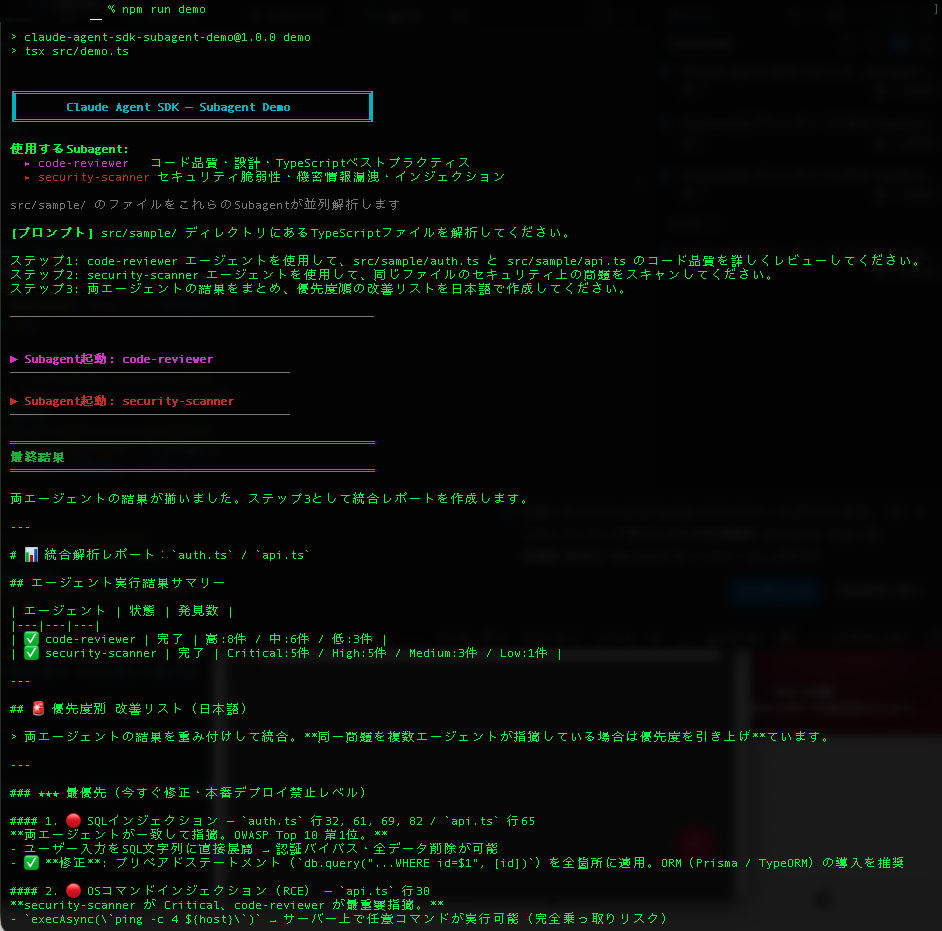
Claude Agent SDKを使って、Subagentを実装してみました。
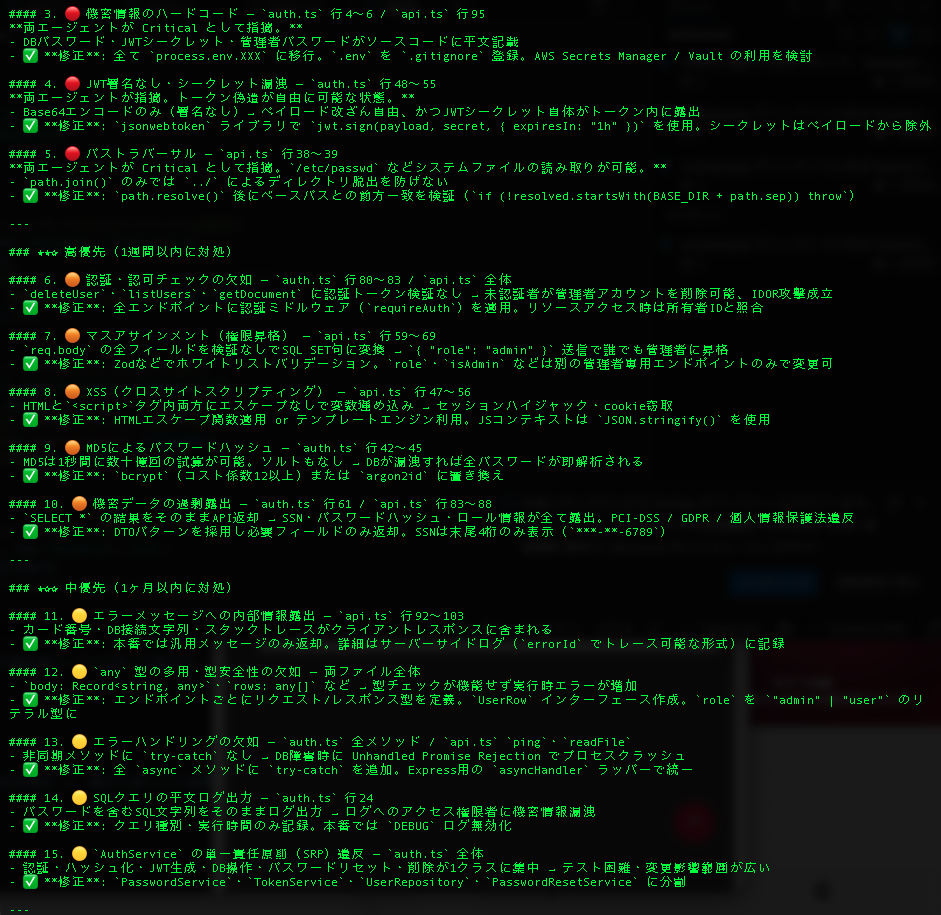
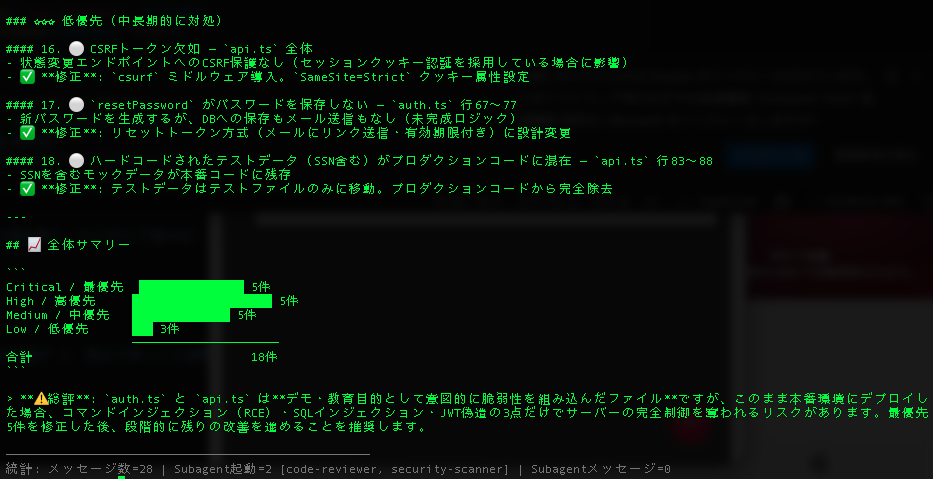
メインからよびだされるサブエージェントが、サブエージェント専用のコンテキストをもつことができることから、正確なタスクを実行することができます。ここではコード品質、セキュリティの二種類のコードレビューをするデモを実行しました。
demo.ts
/**
 * Claude Agent SDK — Subagent デモ
 *
 * このデモでは以下のsubagentパターンを示します:
 *  1. 複数の専門subagentの定義(code-reviewer / security-scanner)
 *  2. Subagentの自動・明示的呼び出し
 *  3. メッセージストリームからsubagent起動を検出
 *  4. モデル・ツールをsubagent毎に個別設定
 */

import { query, type SDKMessage } from "@anthropic-ai/claude-agent-sdk";

// ─── ターミナルカラー ─────────────────────────────────────────────────────────
const c = {
  reset:   "\x1b[0m",
  bold:    "\x1b[1m",
  dim:     "\x1b[2m",
  cyan:    "\x1b[36m",
  green:   "\x1b[32m",
  yellow:  "\x1b[33m",
  blue:    "\x1b[34m",
  magenta: "\x1b[35m",
  red:     "\x1b[31m",
  gray:    "\x1b[90m",
};

// ─── ユーティリティ ───────────────────────────────────────────────────────────

/** parent_tool_use_id が存在する場合、そのメッセージはsubagent内部から発信 */
function isSubagentMessage(msg: SDKMessage): boolean {
  return !!((msg as any).parent_tool_use_id);
}

/** Task tool呼び出しブロックから、起動されたsubagent名を取得 */
function getInvokedSubagent(msg: SDKMessage): string | undefined {
  for (const block of (msg as any).message?.content ?? []) {
    if (block.type === "tool_use" && block.name === "Task") {
      return block.input?.subagent_type as string | undefined;
    }
  }
  return undefined;
}

/** assistantメッセージからテキストブロックを結合して返す */
function extractText(msg: SDKMessage): string | undefined {
  const blocks: any[] = (msg as any).message?.content ?? [];
  const texts = blocks.filter((b) => b.type === "text").map((b) => b.text as string);
  return texts.length > 0 ? texts.join("\n") : undefined;
}

// ─── メイン ───────────────────────────────────────────────────────────────────

async function main() {
  // ヘッダー表示
  console.log(`
${c.bold}${c.cyan}╔══════════════════════════════════════════════════╗
║       Claude Agent SDK — Subagent Demo           ║
╚══════════════════════════════════════════════════╝${c.reset}

${c.bold}使用するSubagent:${c.reset}
  ${c.magenta}▸ code-reviewer${c.reset}   コード品質・設計・TypeScriptベストプラクティス
  ${c.red}▸ security-scanner${c.reset} セキュリティ脆弱性・機密情報漏洩・インジェクション

${c.gray}src/sample/ のファイルをこれらのSubagentが並列解析します${c.reset}
`);

  // ─── Subagentの定義 ────────────────────────────────────────────────────────
  //
  // agents オプションで名前付きSubagentを定義する。
  // ・description: Claude が「いつこのSubagentを使うか」を判断するための説明文
  // ・prompt:      SubagentのSystemプロンプト(専門知識・行動指針を記述)
  // ・tools:       使用を許可するツール一覧(省略すると親から継承)
  // ・model:       このSubagentだけ別モデルを使用可能("sonnet" | "opus" | "haiku")
  //
  // ※ Subagentは Task ツール経由で起動されるため、allowedTools に "Task" が必要

  const agentDefinitions = {
    "code-reviewer": {
      description:
        "TypeScriptコードの品質・保守性・設計パターンのレビュー専門家。" +
        "コード品質、エラーハンドリング、型安全性の問題を発見するために使用する。",
      prompt: `あなたはTypeScript/Node.jsの上級コードレビュワーです。
以下の観点でコードを詳しく検査してください:

- コードの可読性・命名規則の一貫性
- TypeScriptの型安全性とベストプラクティス
- エラーハンドリングの適切さ(try-catchの使い方、エラーの伝播)
- 設計パターンとSOLID原則への準拠
- 重複コードと抽象化の機会
- ドキュメント・コメントの質

問題箇所は必ずファイル名と行番号を明示し、
具体的な改善案とコードサンプルを示してください。`,
      tools: ["Read", "Grep", "Glob"] as string[],
      model: "sonnet" as const,
    },

    "security-scanner": {
      description:
        "セキュリティ脆弱性スキャン専門家。SQLインジェクション、認証バイパス、" +
        "機密データ漏洩、XSS、コマンドインジェクションなどの問題を発見するために使用する。",
      prompt: `あなたはWebアプリケーションセキュリティの専門家です。
以下のカテゴリを重点的にスキャンしてください:

- インジェクション攻撃(SQL / コマンド / LDAP / Path Traversal)
- 認証・認可の不備(セッション管理、アクセス制御)
- 機密データの露出(パスワード・APIキー・個人情報のハードコード)
- XSSおよびレスポンスへの入力値の直接埋め込み
- 安全でない暗号化・ハッシュ化(MD5, SHA1の使用等)
- 設定ミス(デバッグ情報の露出、過剰なエラー詳細)

各発見事項を Critical / High / Medium / Low で評価し、
攻撃シナリオと具体的な修正方法を提示してください。`,
      tools: ["Read", "Grep", "Glob"] as string[],
      model: "sonnet" as const,
    },
  };

  // ─── プロンプト ────────────────────────────────────────────────────────────
  const prompt = `src/sample/ ディレクトリにあるTypeScriptファイルを解析してください。

ステップ1: code-reviewer エージェントを使用して、src/sample/auth.ts と src/sample/api.ts のコード品質を詳しくレビューしてください。
ステップ2: security-scanner エージェントを使用して、同じファイルのセキュリティ上の問題をスキャンしてください。
ステップ3: 両エージェントの結果をまとめ、優先度順の改善リストを日本語で作成してください。`;

  console.log(`${c.bold}[プロンプト]${c.reset} ${prompt}\n`);
  console.log(`${c.gray}${"─".repeat(52)}${c.reset}\n`);

  // ─── 統計 ─────────────────────────────────────────────────────────────────
  const stats = {
    totalMessages: 0,
    subagentMessages: 0,
    subagentInvocations: [] as string[],
  };

  // ─── クエリ実行 ───────────────────────────────────────────────────────────
  for await (const message of query({
    prompt,
    options: {
      // Task ツールを allowedTools に含めることでSubagentが起動可能になる
      allowedTools: ["Read", "Grep", "Glob", "Task"],
      permissionMode: "bypassPermissions",
      agents: agentDefinitions,
    },
  })) {
    stats.totalMessages++;

    // ── Subagent起動の検出 ─────────────────────────────────────────────────
    const invokedName = getInvokedSubagent(message);
    if (invokedName) {
      stats.subagentInvocations.push(invokedName);
      const color = invokedName === "code-reviewer" ? c.magenta : c.red;
      console.log(`\n${color}${c.bold}▶ Subagent起動: ${invokedName}${c.reset}`);
      console.log(`${c.gray}${"─".repeat(40)}${c.reset}`);
    }

    // ── Subagent内部からのメッセージ ──────────────────────────────────────
    if (isSubagentMessage(message)) {
      stats.subagentMessages++;
      const text = extractText(message);
      if (text?.trim()) {
        // 長いテキストは先頭300文字のみ表示(デモの可読性のため)
        const preview =
          text.length > 300
            ? text.substring(0, 300).trimEnd() + " …"
            : text;
        const indented = preview.split("\n").join("\n  ");
        console.log(`${c.dim}  ${indented}${c.reset}`);
      }
    }

    // ── 最終結果 ──────────────────────────────────────────────────────────
    if ("result" in message && message.result) {
      console.log(`\n${c.bold}${c.green}${"═".repeat(52)}${c.reset}`);
      console.log(`${c.bold}${c.green}最終結果${c.reset}`);
      console.log(`${c.bold}${c.green}${"═".repeat(52)}${c.reset}\n`);
      console.log(message.result);
    }
  }

  // ─── 統計サマリー ─────────────────────────────────────────────────────────
  console.log(`\n${c.gray}${"─".repeat(52)}`);
  console.log(
    `統計: メッセージ数=${stats.totalMessages} ` +
    `| Subagent起動=${stats.subagentInvocations.length} [${stats.subagentInvocations.join(", ")}] ` +
    `| Subagentメッセージ=${stats.subagentMessages}${c.reset}`
  );
}

main().catch((err) => {
  console.error(`${c.red}エラー:${c.reset}`, err);
  process.exit(1);
});下記はレビュー対象のコードです。
api.ts
// api.ts — APIエンドポイントハンドラー(デモ用・意図的な問題を含む)

import { exec } from "child_process";
import { promisify } from "util";
import fs from "fs";
import path from "path";

const execAsync = promisify(exec);

// リクエスト/レスポンスの簡易型定義
interface Request {
  body: Record<string, any>;
  query: Record<string, string>;
  params: Record<string, string>;
  headers: Record<string, string>;
}

interface Response {
  json: (data: any) => void;
  send: (html: string) => void;
  status: (code: number) => Response;
}

// ⚠️ 認証ミドルウェアなし
class ApiController {
  // ⚠️ コマンドインジェクション: ユーザー入力をshellコマンドに直接渡す
  async ping(req: Request, res: Response): Promise<void> {
    const { host } = req.body;
    // sanitizationなし — 攻撃例: host = "8.8.8.8; rm -rf /var/data"
    const { stdout } = await execAsync(`ping -c 4 ${host}`);
    res.json({ output: stdout });
  }

  // ⚠️ パストラバーサル: ../../../etc/passwd などのパスを許可
  async readFile(req: Request, res: Response): Promise<void> {
    const { filename } = req.query;
    // path.join は ../ を正規化しないためディレクトリ脱出が可能
    const filePath = path.join("/var/app/data", filename);
    const content = fs.readFileSync(filePath, "utf8");
    res.json({ content });
  }

  // ⚠️ XSS: ユーザー入力をエスケープせずHTMLに埋め込む
  renderProfile(req: Request, res: Response): void {
    const { name, bio } = req.query;
    // 攻撃例: name = "<script>document.cookie</script>"
    res.send(`
      <html>
        <body>
          <h1>Welcome, ${name}!</h1>
          <p>${bio}</p>
          <script>var userName = "${name}";</script>
        </body>
      </html>
    `);
  }

  // ⚠️ マスアサインメント: 全フィールドを検証なしで更新
  async updateUser(req: Request, res: Response): Promise<void> {
    const { userId } = req.params;
    const data = req.body; // フィールドのホワイトリストなし

    // ユーザーが isAdmin=true, role=admin 等を送信可能
    const setClause = Object.entries(data)
      .map(([k, v]) => `${k}='${v}'`) // ⚠️ SQLインジェクションも存在
      .join(", ");

    console.log(`UPDATE users SET ${setClause} WHERE id='${userId}'`);
    res.json({ success: true });
  }

  // ⚠️ 安全でない直接オブジェクト参照: 認可チェックなし
  async getDocument(req: Request, res: Response): Promise<void> {
    const { docId } = req.params;
    // ユーザーIDと所有者の照合をしない
    // 任意のユーザーが任意のdocIdにアクセス可能
    res.json({ docId, content: "sensitive document content" });
  }

  // ⚠️ 過剰なデータ露出: パスワードハッシュ等を含む全フィールドを返す
  async listUsers(req: Request, res: Response): Promise<void> {
    // SELECT * — パスワードハッシュ、トークン等も含む
    const users = [
      { id: 1, username: "alice", password_hash: "098f6bcd4621d373", role: "admin", ssn: "123-45-6789" },
      { id: 2, username: "bob", password_hash: "5d41402abc4b2a76", role: "user", ssn: "987-65-4321" },
    ];
    // ⚠️ フィールドフィルタリングなしで全データを返却
    res.json(users);
  }

  // ⚠️ エラーに内部情報を含める
  async processPayment(req: Request, res: Response): Promise<void> {
    try {
      const { amount, cardNumber } = req.body;
      if (!amount) throw new Error(`Payment failed: card=${cardNumber}, db=mongodb://admin:pass@db:27017`);
    } catch (error: any) {
      // ⚠️ スタックトレースと内部情報をクライアントに返す
      res.status(500).json({
        error: error.message,
        stack: error.stack,
      });
    }
  }
}

export { ApiController };
auth.ts
// auth.ts — 認証モジュール(デモ用・意図的な問題を含む)

// ⚠️ ハードコードされた認証情報
const DB_URL = "mongodb://admin:password@localhost:27017/myapp";
const JWT_SECRET = "super-secret-key-do-not-share";
const ADMIN_PASSWORD = "password";

interface User {
  id: string;
  username: string;
  email: string;
  password_hash: string;
  role: string;
  ssn: string; // 社会保障番号(機微情報)
}

class AuthService {
  private db: { query: (sql: string) => Promise<{ rows: any[] }> };

  constructor() {
    // 接続プーリングなし・エラーハンドリングなし
    this.db = {
      query: async (sql: string) => {
        console.log("Executing:", sql); // ⚠️ SQLをログに出力
        return { rows: [] };
      },
    };
  }

  // ⚠️ SQLインジェクション: ユーザー入力を直接SQLに埋め込み
  async login(username: string, password: string): Promise<string | null> {
    const sql = `SELECT * FROM users WHERE username='${username}' AND password='${password}'`;
    const result = await this.db.query(sql);

    if (result.rows.length > 0) {
      return this.generateToken(result.rows[0]);
    }
    return null;
  }

  // ⚠️ 脆弱なMD5ハッシュ: パスワード保存に不適切
  hashPassword(password: string): string {
    const crypto = require("crypto");
    return crypto.createHash("md5").update(password).digest("hex");
  }

  // ⚠️ 有効期限なし・シークレットをペイロードに含む
  generateToken(user: User): string {
    const payload = {
      id: user.id,
      role: user.role,
      secret: JWT_SECRET, // ⚠️ シークレットがトークンに露出
    };
    return Buffer.from(JSON.stringify(payload)).toString("base64");
  }

  // ⚠️ 機微情報(SSN等)を含む全フィールドを返却
  async getUser(id: string): Promise<User | null> {
    // ⚠️ SQLインジェクション + 過剰なデータ露出
    const result = await this.db.query(
      `SELECT * FROM users WHERE id = ${id}`
    );
    return result.rows[0] ?? null;
  }

  // ⚠️ レート制限なし・弱いパスワード生成・機微情報のログ出力
  async resetPassword(email: string): Promise<void> {
    const result = await this.db.query(
      `SELECT * FROM users WHERE email = '${email}'`
    );
    if (result.rows.length > 0) {
      // ⚠️ 予測可能な弱いパスワード
      const newPassword = Math.random().toString(36).substring(2, 10);
      // ⚠️ パスワードをログに出力
      console.log(`Password reset for ${email}: ${newPassword}`);
    }
  }

  // ⚠️ 認証チェックなしで管理者操作を実行
  async deleteUser(userId: string): Promise<void> {
    // 呼び出し元の認証を検証しない
    await this.db.query(`DELETE FROM users WHERE id = ${userId}`);
  }
}

export { AuthService };
結果